 Intelligence-Console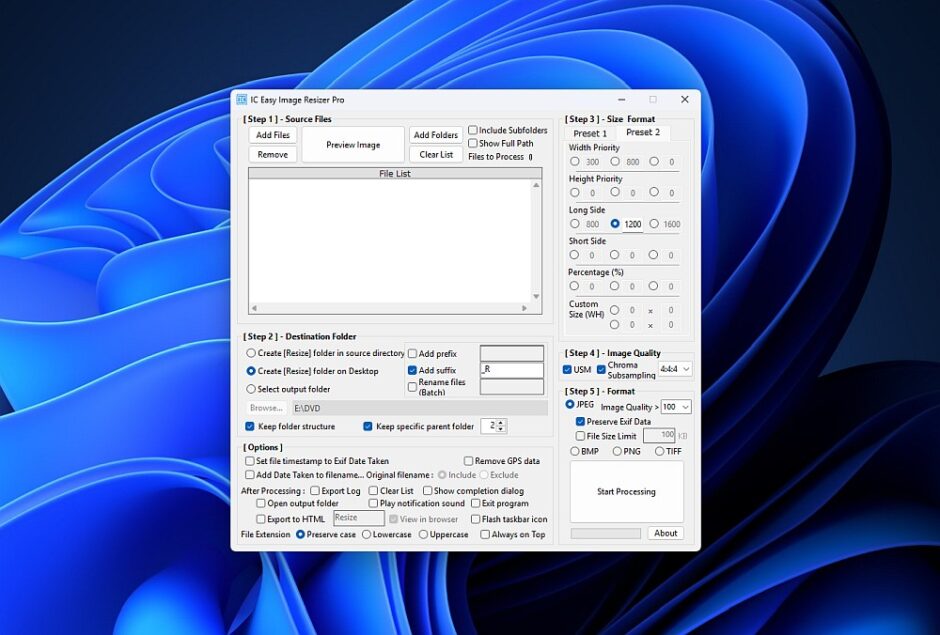
Officially listed and verified as 100% Clean by Softpedia.
Release Date: February 19, 2026
Version: 6.43
Developer: Kazuo Chiba (Intelligence-Console)
Reliable Image Processing with Professional Quality
IC Easy Image Resizer Pro is a quality-focused solution designed for photographers, web developers, and power users who demand uncompromising results. By leveraging advanced libraries such as Libjpeg.NET-ts and SixLabors.ImageSharp, this utility ensures crisp, professional-grade output.
While prioritized for high-fidelity processing and precision, it excels in managing complex workflows by automating the resizing of large image collections while preserving your essential data and directory hierarchy.
Key Features & Capabilities
What’s New in v6.43
Performance & Localization (All Editions)
- Fully Globalized: Complete review of English localization. All interfaces and tooltips are now 100% intuitive for English-speaking professionals.
- Core Engine Optimization: Refactored internal code for better stability, faster batch processing, and reliable window position recovery.
True Portability (Portable Edition Only)
- 100% System-Clean (No Registry, No AppData): Unlike standard portable apps, v6.43 does not use the Windows Registry or the AppData folder.
- Local Configuration: All settings are stored exclusively in
settings.configwithin the app folder. Your system remains untouched, and you can carry your entire environment on a USB drive.
- Smart Directory Mirroring: Maintain your original folder structure automatically when saving resized images—essential for organizing large-scale projects without manual effort.
- Professional Quality Control: Fine-tune your output with adjustable JPEG quality (1-100) and Chroma Subsampling options.
- Advanced Clarity: The built-in Unsharp Mask ensures your images remain sharp and clear after scaling.
- Metadata Preservation: Keep your critical Exif data intact for JPEG files. (Note: Exif preservation is currently not supported for TIFF output).
- Optimized Performance: Features a “High-Speed (GDI+ 4:2:0) mode” for quick tasks, while offering advanced Chroma Subsampling control to eliminate color bleeding.(v6.24)
Note: High-speed processing is active by default. Unchecking “Chroma Subsampling” enables the GDI+ 4:2:0 Fast Mode. - DPI Integrity: Ensures image resolution (DPI) is preserved from source to destination, maintaining professional print standards.(v6.24)
- Alpha Channel Support: Seamlessly handles transparency for PNG and TIFF files, keeping your visual assets intact.(v6.24)
- Global User Interface: Improved English accessibility with comprehensive tooltips for all professional resizing modes.(v6.25)
- System Integrity: Complete migration to a “Registry-Free” architecture, ensuring a cleaner and more portable environment. (v6.31)
- Versatile Format Support:
- Full Support (Read/Write): JPEG, PNG, BMP, TIFF.
- Input Only (Read): GIF, WebP. (Easily convert your GIF/WebP files into high-quality JPEG, PNG, BMP, or TIFF formats).
- Lightweight & Reliable: Built on the .NET Framework 4.8, optimized for Windows 11 and 10.
🛡️ Verified Security & Quality
We are proud to announce that IC Easy Image Resizer Pro has been rigorously tested and is now listed on Softpedia, one of the world’s largest and most reputable software archives.
- Verified Malware-Free: Tested against viruses, adware, and spyware.
- Editor’s Choice Reference: Recognized for its professional-grade features and reliability.
- View our profile on Softpedia
To download the ZIP archive, please visit our dedicated download page via the link below:

👉 Go to Download Page: IC Easy Image Resizer Pro v6.43 (Installer Edition)
Note: The installer version uses the registry solely to store uninstallation information (standard Windows behavior). However, the IC Easy Image Resizer Pro application itself is completely registry-free and does not alter your system settings.
👉 Go to Download Page: IC Easy Image Resizer Pro v6.43 (Portable Edition)
(You will be redirected to our secure download manager site.)
| Feature | Installer Edition | Portable Edition |
|---|---|---|
| Setup | Standard Windows Setup (.exe) | Just unzip and run (.zip) |
| Settings | Saved in AppData (Standard) | Saved in App Folder (Local) |
| Best For | Daily use on a fixed PC | USB drives & clean systems |
Licensing: Free for Everyone
This software is released as Freeware for both personal and commercial use.
After a long career in software development in Japan, the developer, Kazuo Chiba, continues to maintain this tool as an independent project following his retirement in 2025. Guided by the philosophy that “Professional tools should be accessible to everyone,” this Pro version is provided at no cost to empower creators worldwide.
Trademark Disclaimer: All product names, logos, and brands are property of their respective owners. All company, product and service names used in this website/software are for identification purposes only. Use of these names, logos, and brands does not imply endorsement.
Support the Future of This Project
While the software is free, its continued development and maintenance rely on the generous support of the community. If this tool saves you time and enhances your workflow, please consider making a donation. Your contribution directly funds the infrastructure and time required to keep this utility updated for years to come.

Get Started Today
Download the latest version and access the installation guide on our official portal:
Official Download & Support: https://intelligence-console.com/rckp
Disclaimer: “IC Easy Image Resizer Pro” is an independent software product and is not affiliated with, authorized, or endorsed by any other product, company, or brand. All trademarks are the property of their respective owners.
Official Website: https://intelligence-console.com/